Welcome to Whozon
Whozon is designed to keep your moderation tools, channel context, and control actions in one lightweight dashboard. The goal is to reduce tab switching during live moments and make common actions fast, visible, and predictable.
Why Build This?
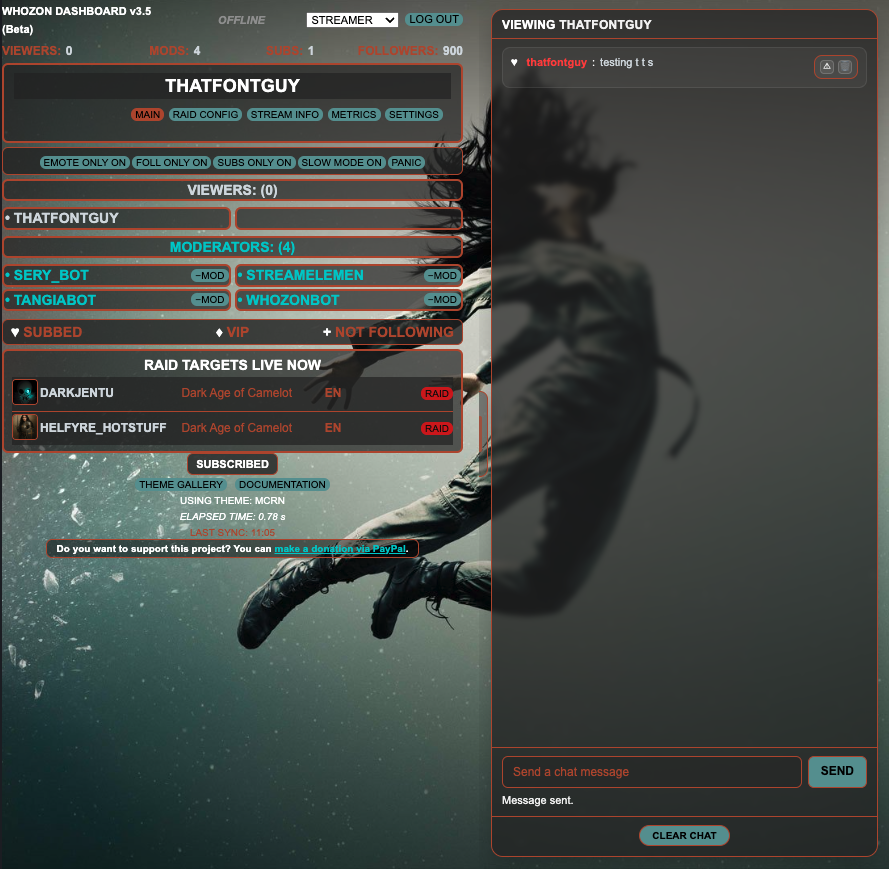
When I started streaming, I had the usual insecurity about viewers and learning the art of being entertaining while also being highly distracted playing a game. Whozon was built to help me deal with the situation. Its gone through a half dozen iterations, and many, many rewrites, regressions etc. Its gone from Desktop format to web based application and now back to Desktop again (only this time its practical) as well as being an online web application. The main focus has always been to place some convenient, easily accessible tools and reporting available at a glance. This version is now doing everything I originally intended the application to do - and then some, as there has been feature creep as well.
If you are a small streamer - this might help you. Its up to you to decide if the tools I am making accessible via this application help you in any way. If you install it on your PC or you use the web version, I would appreciate any and all comments and suggestions.
Design Principles
Let's face it, this is a simple application, most of its functionality is on the Main page and that is deliberate. Its intended to be run on a second monitor probably alongside your OBS software and simply provide some useful utility and feedback while you stream. You might spend many streams only glancing at it, but when you suddenly need to hit the PANIC button it will be there to save you. If you really want to know if you have viewers you can see at a glance (and if you want the utility of the program but don't want to see your viewers and count displayed you can turn that off in Settings). If you lose track of your chat and fail to notice new arrivals, you can turn on TTS and have message spoken to you by really good Text To Speech voices from Amazon Polly.
How to Use This Documentation
Its a web page. You got this. If however you notice something I have missed, please let me know. If you have the desktop app you can send Feedback via the button at the bottom of the page.